
Home by ShowingTime
ShowingTimeHouse & Home
3.32.02K Reviews
- Version
- 2.3.7
- Installs
- 500.00K
- Age Rating
- Everyone
Screenshots

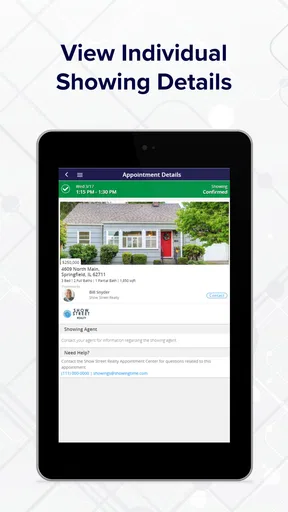
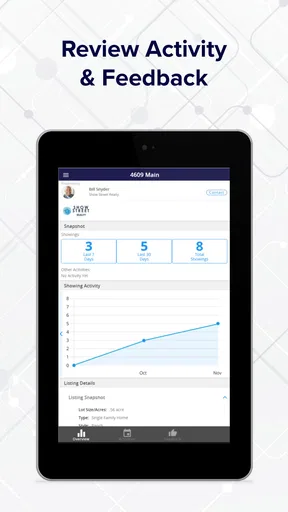

Our Review of Home by ShowingTime
 Analysis by Appyee
When I first looked at Home by ShowingTime, I did not treat it as another general home-organization app. Its purpose is narrower and more practical: it is built around property showings, tours, and feedback. That distinction matters. If you are a homeowner trying to arrange one occasional visit, the app may feel more specialized than necessary. If you are regularly coordinating buyers, sellers, agents, and viewing appointments, its focus becomes much more appealing.
The app comes from ShowingTime and sits in the House & Home category. It is free to install, aimed at Everyone, and has passed the half-million-install mark. Those details suggest a tool intended for broad access rather than a niche professional utility locked behind an upfront purchase. Still, its real value depends less on the download itself and more on whether your property-viewing routine is complicated enough to benefit from a dedicated place for it.
How I Would Decide Whether Home by ShowingTime Fits
I’d decide whether Home by ShowingTime deserves a place on my phone by testing it against one real stretch of property showings, not by judging it after a quick browse. I’d pay attention to whether the people involved actually use the shared process and whether I return to it without being reminded. That makes the next question less about first impressions and more about whether its value holds up as the routine continues.
Start with the problem, not the download
The first question I would ask is simple: am I trying to manage a showing process, or am I only trying to remember appointments? A normal calendar is often enough for the second job. It can hold a date, time, address, and reminder without asking anyone to learn a new workflow. Home by ShowingTime becomes more relevant when a showing involves several people and the information needs to stay connected to the property visit itself.
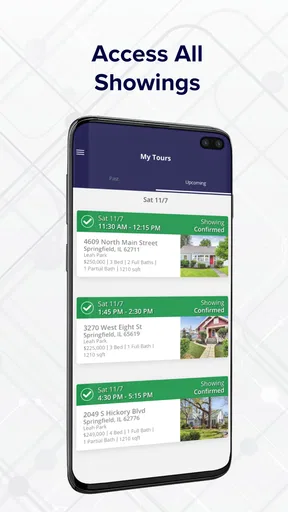
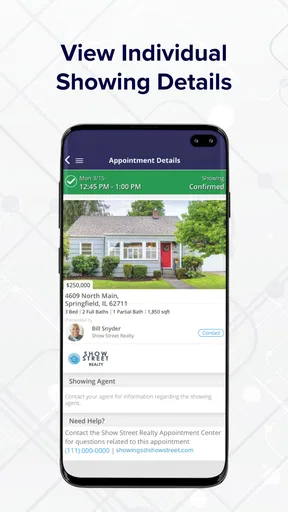
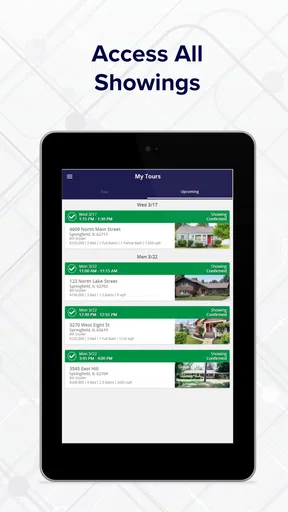
Its store summary points to four connected tasks: managing showings, arranging tours, collecting feedback, and handling related activity. I see that combination as the app’s central idea. Instead of treating every viewing as an isolated calendar entry, it gives the process a more dedicated home. That can reduce the awkward back-and-forth that happens when one person is using text messages, another is checking email, and someone else is keeping notes in a spreadsheet.
For a buyer, the useful question is whether the app helps you follow a planned tour without losing the thread between appointments. For a seller, the question is whether showing activity and responses are easier to follow than they would be through scattered messages. For an agent, the decision comes down to whether a focused showing tool saves enough coordination time to justify adding another app to the phone.
Who is most likely to benefit
I would put real-estate professionals and people actively involved in a property sale near the top of the list. An agent handling several appointments has a stronger reason to use a dedicated showing workflow than someone arranging a single open-house visit. Likewise, a seller who wants a clearer view of visits and reactions may appreciate having those details associated with the home rather than buried in a long conversation.
Buyers can also find value when they are touring multiple homes and need a more organized process. The benefit is not necessarily that the app replaces every planning tool on the phone. It is that showing-related information has a better chance of remaining connected to the property and the people involved. That becomes especially useful after a busy day of viewings, when it is easy to confuse which comments belonged to which home.
I would be more cautious if your needs are mostly about decorating, repairs, rent payments, household budgets, or maintenance reminders. The House & Home label is broad, but this is not a general-purpose household dashboard. Its identity is tied to real-estate showings. Choosing it for unrelated home tasks would be like using a travel itinerary tool to manage a grocery list: possible in spirit, but not a natural fit.
The practical criteria I would use
Before committing, I would judge the app on four things. First is coordination: can it make a showing easier to arrange than a chain of messages? Second is continuity: can I keep track of what happened before, during, and after a visit? Third is participation: does it work for the people who need to interact with the showing process, not just the person who created it? Fourth is switching effort: will my agent, clients, or household members actually use it consistently?
That last point is easy to underestimate. A showing app only helps when the relevant people accept its workflow. If one participant refuses to use it, you may end up copying the same details into text messages and email anyway. In that situation, the app can become an extra layer instead of a simplification. I would therefore introduce it at the beginning of a property search or sale, rather than halfway through when everyone already has a different system.
Where the focused workflow works well
In my view, the strongest part of Home by ShowingTime is its concentration on the showing cycle. The app is not trying to be a broad productivity suite. That gives it a clearer job: help people deal with property visits and the information surrounding them. A focused tool can be easier to understand than a large platform with dozens of unrelated sections.
One useful way to approach it is to treat each viewing as a small record of an ongoing decision. The appointment is only the beginning. There is also the preparation, the tour itself, the response afterward, and the comparison with other homes. Keeping those stages mentally connected can make the buying or selling process less chaotic. I would use the app as a companion to my broader planning system, while allowing it to handle the showing-specific part.
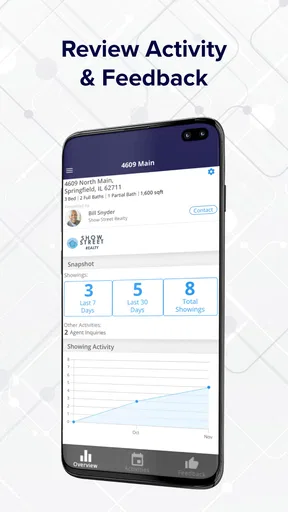
For an agent, the advantage may appear in the handoff between appointments. Rather than reconstructing the day from memory, the agent has a more relevant place to check showing activity and feedback. For a seller, the feedback function can make reactions more useful than vague comments remembered later. For a buyer, tour management can help turn a series of visits into a process that is easier to review afterward.
A realistic day-to-day example
Imagine I am helping a family view several homes over a weekend. We have different appointment times, a changing route, and several people who need to know when each visit is happening. With a normal calendar, I could create separate entries, but the property-related conversation would still likely spill into messages. After each viewing, opinions might arrive at different times and become mixed together.
With Home by ShowingTime, I would use the showing-oriented workflow as the central reference point. Before leaving, I would check the planned visits and make sure everyone knows the schedule. After each property, I would record or review the relevant feedback while the details are still fresh. At the end of the day, I would have a better chance of separating genuine impressions from the general exhaustion that comes with seeing several homes in succession.
The important insight is that the app’s value grows with repetition and coordination. For one appointment, the difference may be minor. For a sequence of showings involving several people, the dedicated context becomes more worthwhile. That is the kind of trade-off I would explain to a friend: do not install it because the word “home” sounds broad; install it because your home-viewing process is becoming difficult to manage informally.
Feedback is more useful when it is timely
A practical habit I would recommend is handling feedback close to the visit instead of postponing it until the evening. Memory tends to blend properties together, especially when homes share similar layouts or neighborhoods. Entering impressions while they are still specific makes the information more useful for later decisions.
I would also separate immediate reactions from final judgments. A property can feel disappointing during a rushed tour and still deserve a second look, while an attractive first impression can fade after practical concerns are considered. The app should not be treated as a substitute for careful thinking. Its role is to keep the showing-related response organized so that I can think more clearly afterward.
For sellers, this also suggests a sensible expectation. Feedback is valuable as a pattern, not as a verdict from one visit. I would look for repeated comments across showings rather than reacting dramatically to every individual opinion. A showing-management tool can help expose those patterns, but the interpretation still belongs to the people making the property decision.
Where the app may create friction
The average rating is 3.4 from around 5,000 ratings, with roughly 2,000 written reviews. I would read that as a reason to keep expectations measured. The app has enough adoption to be relevant, but the rating does not suggest that every user finds the experience effortless. A specialized workflow can be useful while still frustrating people who want a simpler, faster interaction.
One likely source of friction is the need for shared participation. A calendar works even if nobody else changes their habits. A showing-centered app is more dependent on the people around the property process. If an agent prefers phone calls, a buyer relies on text messages, and a seller checks email, the benefits can be diluted. I would confirm that the people involved are comfortable using the same channel before making it the main reference point.
Another limitation is scope. The app should not be expected to replace every tool involved in buying or selling a home. It may help with showings, tours, and feedback, but that does not make it a complete financial planner, document manager, renovation tracker, or household organizer. Keeping those boundaries in mind prevents disappointment and makes the app easier to evaluate fairly.
How it compares with ordinary alternatives
The most obvious alternative is the phone’s calendar combined with text messages. This approach is flexible, familiar, and nearly frictionless for small groups. It is probably better when you have only one or two appointments and everyone already communicates comfortably by message. Its weakness is that property details, timing changes, and feedback can become scattered across separate conversations.
Email can be more formal and easier to search than texting, especially when an agent needs to share information with several people. However, email threads often become unwieldy during a fast-moving tour schedule. Important changes can sit below older messages, and feedback may arrive without a clear connection to the visit that prompted it.
A spreadsheet offers another familiar option. It can compare homes, add notes, and support personal decision-making. I would choose it when my main goal is evaluating price, location, room count, or long-term preferences. I would not choose it as the primary showing-coordination tool unless everyone involved is already disciplined about updating it. A spreadsheet is excellent for structured comparison but less natural for a live appointment workflow.
Home by ShowingTime is most convincing in the space between those alternatives. It is more focused than a calendar, less fragmented than messaging, and more directly connected to showings than a general spreadsheet. That does not make it universally superior. It means its advantage appears when the showing process itself is the problem to solve.
What switching really involves
Because the app is free, the financial barrier is low. The larger cost is behavioral. You need to decide where new showing information belongs, explain the workflow to the people involved, and resist falling back to old habits whenever the schedule becomes busy. That setup effort is modest for an active agent but may feel unnecessary for a casual user.
I would reduce the switching cost by choosing one property or one tour as a trial rather than moving every home-related task at once. Keep general reminders in the calendar if that is what your household already understands, while using the app specifically for showing activity and feedback. After the trial, ask whether fewer details were lost and whether follow-up became easier. If not, there is little reason to force the change.
It is also worth keeping a backup communication method for urgent changes. A dedicated app can organize the process, but real life includes missed notifications, busy schedules, and people who are not looking at their phones. I would never let a single app become the only way to communicate a time-sensitive change to a property visit.
Version, access, and everyday usability
The current release is version 2.3.7 and it requires Android 8.0 or later. That makes the operating-system requirement important for anyone using an older phone. Before planning a busy tour around it, I would check the device rather than assuming every Android handset can install the app.
The free price is helpful for trying the workflow without making a purchase decision first. It also makes the app easier to suggest to a buyer or seller who may only need it during one active property search. The Everyone age rating supports that broad accessibility, although the app’s practical audience is still shaped more by involvement in real-estate showings than by age alone.
I would judge the interface less by how many functions appear on the first screen and more by how quickly I can answer three questions: what showing is next, who is involved, and what happened after the last visit? Those are the moments that determine whether the app is helping. If reaching those answers feels slower than opening a calendar or message thread, the specialized design loses much of its advantage.
Who should choose something else
I would skip Home by ShowingTime if I am only looking for a basic reminder app, a home inventory, a repair log, or a way to manage household chores. Its showing focus would add complexity without solving my actual problem. I would also hesitate if the agent or group coordinating the property does not use the same workflow, because the app’s usefulness depends on shared context.
A general calendar is the better choice for a simple schedule. A spreadsheet may be better for detailed personal comparisons between properties. Messaging may remain better for a small, informal group that needs quick conversation rather than structured showing information. These are not failures of the app; they are situations where its specialization is less valuable.
My recommendation after weighing the trade-offs
I recommend Home by ShowingTime to people who are actively arranging or following multiple property showings and want a dedicated place for tours and feedback. I especially see a good fit for agents, sellers working through an organized showing process, and buyers whose property search has grown beyond a few casual appointments. The free access lowers the risk, so trying it during one real tour is reasonable.
I would not recommend installing it simply because it belongs to the House & Home category. Its value is specific, and that is both its strength and its limitation. If your main challenge is keeping showing details connected, it can be more useful than a loose collection of calendar entries and messages. If your challenge is broader household organization, another category of app will serve you better.
My final view is that the best reason to use this app is not the number of features, but the context it gives to a busy showing process. It turns property visits, tours, and reactions into a more coherent workflow, provided the people involved actually participate. With its free price, broad age rating, and support for Android 8.0 or later, it is easy to test. I would give it a chance during an active search or sale, then keep it only if it genuinely reduces the amount of scattered coordination I have to do.
Privacy and Permissions
See what permissions an app requests and how it handles your data.
- Location
- approximate location (network-based), precise location (GPS and network-based)
- Phone
- directly call phone numbers, read phone status and identity
- Photos/Media/Files
- read the contents of your USB storage, modify or delete the contents of your USB storage
- Storage
- read the contents of your USB storage, modify or delete the contents of your USB storage
- Camera
- take pictures and videos
- Microphone
- record audio
- Wi-Fi connection information
- view Wi-Fi connections
- Device ID & call information
- read phone status and identity
- Other
- view network connections, pair with Bluetooth devices, access Bluetooth settings, send sticky broadcast, full network access, change your audio settings, reorder running apps, draw over other apps, prevent device from sleeping, read Google service configuration
Verdict
Strengths of Home by ShowingTime
- Personalized listings make it easier to focus on relevant homes.
- Saved searches help track new properties that match your criteria.
- Property photos and details are convenient to browse on mobile.
- Useful for comparing homes while traveling or away from a computer.
- The interface is generally straightforward for first-time home shoppers.
Limitations of Home by ShowingTime
- Listing availability may vary by location and local market coverage.
- Some property details can become outdated between listing updates.
- Frequent alerts may feel excessive unless notification settings are adjusted.
- The app is less useful in areas with limited ShowingTime-supported listings.
- Browsing homes does not replace professional advice or an in-person viewing.
Similar Picks in This Category
View All
Universal TV Remote Control
CodeMatics Media Solutions3.9

AlfredCamera Home Security app
Alfred Systems Inc.4.7

Planner 5D: AI Home Design
Planner 5D4.5

Universal Tv Remote-Cast to TV
One Music Player4.1

Zillow: Homes for Sale & Rent
Zillow Group4.8

99acres Buy/Rent/Sell Property
infoedge.com4.3
Frequently Asked Questions
What is Home by ShowingTime, and who is it designed for?
Home by ShowingTime is a real estate search app that helps users discover homes for sale or rent, view property details, save favorites, and communicate with real estate professionals. It is mainly designed for buyers and renters, but sellers and agents may also find it useful for monitoring listings, sharing properties, and staying informed about activity in a local market.
Can I search for homes by location, price, and property features?
Yes. The app lets you search using common criteria such as city, neighborhood, ZIP code, price range, number of bedrooms and bathrooms, property type, and other listing details. Depending on the market and available data, you can also review map locations, photos, descriptions, open-house information, and listing status. Search results may vary by region and local MLS coverage.
Are the listings and property information in Home by ShowingTime accurate and up to date?
Home by ShowingTime receives listing information through participating real estate data sources, so many details are updated as agents or MLS systems make changes. However, prices, availability, showing times, and property status can change quickly. Before making a decision or arranging a visit, verify important information with the listing agent, especially for properties marked as pending, contingent, or recently updated.
Can I contact an agent or schedule a property showing through the app?
In supported areas, the app can help you connect with the agent associated with a listing and request or arrange a showing. The exact options depend on the brokerage, MLS, and agent’s setup. You may need to provide contact details and select a preferred date or time. A request is not always an immediate appointment confirmation, so wait for the agent’s response before visiting.
Is Home by ShowingTime free to download and use?
Home by ShowingTime is generally available as a free download for users searching for real estate, although certain services or features may depend on local participation and the connected brokerage or MLS. Standard mobile data charges may apply when browsing photos, maps, or videos. Availability, supported functions, and privacy options can differ between Android and iOS and may change with future updates.
